
You have no items in your shopping cart.

In 2026, an Interactive Game Wall can turn a blank surface into a shared play space. But the right setup depends on who will use it, where it will sit, and how much maintenance is practical. Projection-based walls create large, flexible play areas. LED and touchscreen walls offer bright visuals and direct interaction. Camera- and sensor-driven systems let players move, jump, or gesture without holding a controller. Some venues also choose climbing or hybrid walls, combining physical activity with digital games.
Each type has trade-offs. Projection systems may need controlled lighting and clear floor space. Touch displays can feel responsive, though their size and upkeep affect cost. Motion-based games invite group play, but tracking can be less reliable when several people move at once. Small details matter. A bright window can wash out an image; a crowded room can disrupt a sensor.
This guide compares the leading wall types through practical criteria: interaction style, audience, installation needs, durability, and content flexibility. These considerations reflect common design questions, not a guarantee of performance. Specifications vary by product, so buyers should confirm them with manufacturers and test games in the intended space. A short demo helps. So does asking who cleans, updates, and repairs the system. The most impressive wall is not always the best fit. Sometimes, the simpler option keeps players engaged longer.
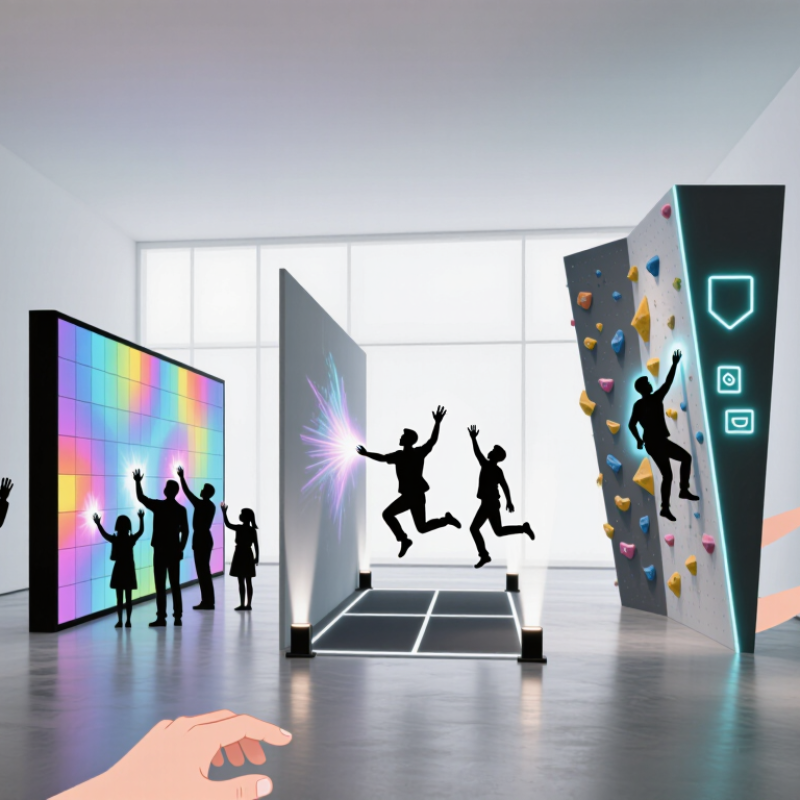
An interactive game wall turns a flat surface into a shared play area. In 2026, common types include projection-based walls, touch-sensitive displays, and modular LED panels. Each supports different spaces and budgets. A projector can cover a large wall, while a touch display offers direct, precise interaction. LED panels stay bright in well-lit rooms, but their size and setup can raise costs. Simple idea.
A game begins when software displays targets, paths, or moving objects. A camera or depth sensor tracks gestures, position, or movement across the play area. Touch-based systems detect contact directly. The software compares each input with the game rules, then updates the screen with points, sounds, or new challenges. A player might swipe at a virtual ball and see it bounce within a fraction of a second. Fast feedback matters; even a small delay can make play feel awkward.
For reliable results, installers calibrate sensors to the wall and test them under the room’s actual lighting. Nearby windows, reflective surfaces, and crowded play areas can affect tracking. Small calibration errors matter. Good design also considers reach, clear instructions, and enough room for several players. Not every game wall works equally well for every age or ability. Testing with real visitors often reveals details that a demo misses.
Projection-based interactive game walls turn a plain surface into a shared play area using a projector, motion sensors, and game software. Players might kick a virtual ball, tap floating targets, or guide moving shapes with their hands. The wall needs a clear projection surface and enough open floor for safe movement. Bright, even lighting helps, though direct sunlight can wash out the image. Fast, vivid, social.
These walls suit schools, family activity centers, and event spaces where several people may play at once. A practical setup test should check sensor coverage from the edges, not only from the center. Small blind spots can frustrate players when the game misses a kick or gesture. That detail is easy to overlook. Ceiling height, wall texture, and ambient light also affect performance, so specifications should be checked before installation. Staff may need time to learn basic calibration and cleaning routines. Projection can be flexible, but it is not maintenance-free. I would also avoid assuming every game works equally well for different ages or mobility levels; trial sessions often reveal awkward controls that look fine on paper. A thoughtfully chosen game library and adjustable difficulty make the wall more useful over time.
LED and touchscreen game walls serve different play styles. LED walls suit large rooms, where players throw, kick, or move toward bright targets. Touchscreens work better for close interaction, such as tracing paths or tapping timed objects. The best choice depends on player distance, group size, and how often the surface will be cleaned.
Grand View Research’s Interactive Display Market report estimates a market value of USD 42.84 billion in 2023 and projects an 8.2% compound annual growth rate from 2024 to 2030. This signals wider adoption of interactive displays, but it is not a forecast for game walls alone. Treat it as context, not a sales guarantee. A growing market does not automatically mean a better installation.
For LED walls, check viewing distance, brightness under room lighting, and whether seams distract during fast play. For touchscreens, test response with small hands, damp fingers, and repeated taps. Small details matter. Ask operators to trial the actual games before purchase; a smooth demo can hide awkward reach or delayed feedback. Maintenance deserves equal attention: one damaged panel should not turn the whole play area into a dark patch. No setup is perfect, and high-resolution hardware can still feel frustrating when content is poorly designed.
Motion-tracking and mixed-reality game walls turn a broad surface into an active play area. Sensors detect movement, while software translates a raised hand, step, or thrown foam ball into an on-screen response. Players can see the effect immediately. Fast feedback matters.
Mixed-reality designs add digital targets or pathways to the physical wall, making a simple room feel more game-like without requiring headsets. The distinction is useful: motion tracking reads player movement, while mixed reality combines physical surroundings with digital elements. In a well-tuned setup, a glowing target appears where players expect it. Calibration can still drift, though, especially after equipment is moved.
For operators, reliability depends on more than impressive visuals. Lighting, sensor placement, floor space, and response delay all affect play. Bright windows can confuse some sensors. Testing with children, adults, and wheelchair users can reveal awkward reach zones or unclear instructions. A few interactions may feel repetitive, too. That trade-off deserves attention: clear, responsive play often matters more than adding another visual effect. Regular checks of calibration and cables help keep sessions consistent.
| Game Wall Type | How Interaction Is Tracked | Typical Gameplay | Best-Fit Settings | Key Strengths | Practical Considerations |
|---|---|---|---|---|---|
| Camera-Based Motion-Tracking Wall | One or more cameras detect players’ positions, gestures, or body movement in front of a display or projection surface. | Dodging, reaching, jumping, posing, and moving virtual objects with body gestures. | Family entertainment venues, museums, school activity areas, and event spaces. | Supports hands-free play and can accommodate several players when the tracking area and software allow it. | Lighting, camera placement, viewing angles, and people crossing the play area can affect tracking reliability. |
| Depth-Sensing Interactive Wall | A depth sensor measures distance and shape, helping the system distinguish players from the background. | Full-body movement games, virtual sports, and interactions that respond to a player’s location or reach. | Indoor venues with a defined play zone and enough space between players and the wall. | Provides spatial information beyond a standard video image and can support responsive, touch-free play. | Performance depends on sensor range, field of view, occlusion, and the size of the play area. |
| Gesture-Recognition Projection Wall | A camera or optical sensor detects hand gestures and movement on or near a projected image. | Virtual buttons, hand-controlled puzzles, drawing activities, and simple collaborative games. | Interactive exhibits, libraries, classrooms, and temporary installations. | Can turn a large wall into an intuitive interface without requiring handheld controllers. | Bright ambient light may reduce projection visibility; calibration and clear gesture design are important. |
| Touch-Enabled Game Wall | Touch frames or other touch-sensing systems register finger or stylus contact with a display surface. | Multiplayer puzzles, strategy games, sorting challenges, and map-based activities. | Staffed venues, learning spaces, and locations where players can reach the screen comfortably. | Offers direct, easy-to-understand input and precise selection for interfaces with many on-screen elements. | Requires physical contact; screen height, accessibility, cleaning, and simultaneous-touch capacity should be considered. |
| Mixed-Reality Game Wall | Computer vision and spatial mapping align digital content with a real room or wall; interaction may use gestures, tracked devices, or touch. | Games in which virtual objects appear anchored to the wall or interact with mapped physical surroundings. | Immersive attractions, interactive exhibits, and specially designed entertainment rooms. | Combines physical space with digital scenes, enabling play that extends beyond a flat on-screen interface. | Needs accurate spatial setup and suitable hardware; movement areas, visibility, and player safety must be planned. |
| Multi-Player Tracking Wall | Computer vision or depth sensing identifies multiple players and maps their positions to the game. | Team challenges, head-to-head competitions, cooperative movement games, and group reaction games. | Arcades, recreation centers, corporate events, and other high-throughput group settings. | Encourages social play and can make a large display engaging for spectators as well as participants. | Player overlap, crowded play zones, and unclear turn-taking can complicate tracking and gameplay. |
What Are the Top Interactive Game Wall Types in 2026?
To compare interactive game wall types, look beyond the game list. Projection walls create large, seamless play areas and suit rooms with controlled lighting. Bright windows can wash out the image. LED walls stay vivid in brighter spaces, but panels may need more careful servicing. Camera-based systems track body movement without handheld controllers. Their accuracy depends on camera placement, crowd size, and clear sightlines. Touch-sensitive walls offer direct, easy-to-understand play. Yet frequent contact can mean more cleaning and surface wear. Test the system with real users, not only a polished demonstration. Small delays feel much bigger during fast games.
Room conditions matter. Measure the usable wall area, ceiling height, ambient light, and distance between players and sensors. Then compare response time, sound levels, game variety, accessibility, and how easily staff can restart a session. Ask what routine maintenance involves and whether replacement parts are readily available. That matters. A technically impressive wall can disappoint if setup takes too long between groups. No type wins every room, and comparisons can feel messy when suppliers use different performance measures. Request the same practical test from each provider: several players, varied movement, and a busy-room lighting setup. Note what works—and what still feels awkward.
A comparison of common technologies by typical installation characteristics.
Ratings use a 1–5 qualitative scale, where 5 is higher. They summarize typical trade-offs: projection systems offer flexible, large play areas but are more affected by ambient light; touch displays provide direct interaction but constrain play to the screen; sensor-based walls support movement-based play, with performance depending on sensor placement and room conditions. Ratings are comparative guidance, not standardized test results.