
You have no items in your shopping cart.

A delivery notification arrives while the resident is away. At the building entrance, a courier enters a code, places the parcel inside a metal compartment, and closes the door. The Smart Locker Lock records the event and sends an access code or app notification to the recipient. That small handoff can reduce missed deliveries, but only when the lock, software, and user instructions work together.
The market is growing alongside demand for convenient parcel collection. Grand View Research estimated the global smart locker market at about $1.1 billion in 2023, and forecast growth through 2030. Figures vary by report scope, so they should be treated as estimates, not guarantees. Parcel-industry analyst Satish Jindel has highlighted the cost pressure of the final delivery stage: “The last mile is the most expensive part of delivery.” Smart lockers offer one practical way to consolidate those handoffs.
So, what happens inside the lock? Depending on the model, a keypad, RFID reader, QR code, or mobile credential verifies access. An electronic controller checks the permission, releases the latch, and logs the transaction. Some systems also track door status and send alerts when a compartment stays open. Still, a locker is not magic. Network outages, weak installation, and confusing pickup messages can disrupt a smooth delivery. This guide explains the main lock types, how their components work, and what to consider before choosing one.
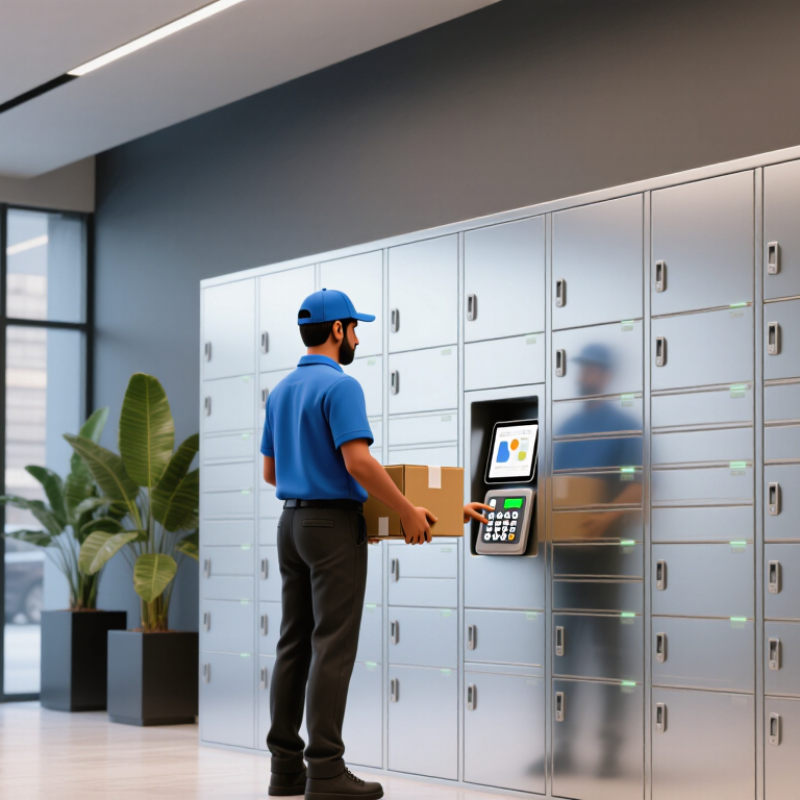
A smart locker lock is an electronic mechanism that controls access to an individual locker compartment. Instead of relying only on a metal key, it checks a credential such as a PIN, QR code, access card, or mobile pass. If the credential is approved, a motor or solenoid releases the latch. A door sensor can then record whether the compartment opened and closed.
That distinction matters: the lock is the access-control part, while the locker system may also include software, a screen, and network connections. The term can be used loosely, so product specifications deserve a close read.
These locks are useful where many people need controlled, traceable access, including workplaces, schools, and parcel rooms.
Pitney Bowes’ 2024 Parcel Shipping Index estimated that the United States handled 21.2 billion parcels in 2023. That volume helps explain the appeal of self-service collection points, though it does not prove that every site needs smart locks.
A careful setup defines who can issue credentials, how lost phones or forgotten codes are handled, and what happens during a network outage. Some locks can validate access locally; others depend more heavily on a connected system.
Small detail, big difference.
Logs also need sensible access limits, since recording every opening can create privacy concerns.
A smart locker lock is a small system, not just an electronic latch. Its main parts are the locking mechanism, a controller, an access reader, sensors, and a power source. The reader may accept a PIN, card, or phone credential. After checking the credential, the controller signals the actuator to release the latch. That is the basic sequence. A door sensor can then report whether the locker is open or closed, while a network connection may send status updates to a management system. Not every model includes every component.
Tips: Check how the lock behaves when its battery runs low. Look for a clear status light or warning, and confirm that authorized staff can resolve a fault. Test the door sensor with the locker both fully shut and slightly ajar. Small detail, big difference.
In a well-designed setup, each component has a defined role: the reader collects an input, the controller makes the access decision, and the actuator moves the latch. The network is useful for remote monitoring, but it should not be mistaken for the lock itself. A practical review should also consider installation, maintenance access, and signal reliability in the actual locker location. Metal cabinets can affect wireless performance. I would not assume every alert arrives instantly; test the system under everyday conditions.
A smart locker lock replaces or supplements a physical key with electronic access controls. Users may authenticate through a keypad code, access card, mobile credential, or a combination. The lock checks the presented credential against permissions set by the locker system. Authentication confirms who or what is requesting access; authorization determines whether that credential can open a particular compartment.
A typical request begins in an app, at a kiosk, or on the lock itself. A user selects an available locker, then verifies their identity or enters an assigned code. If access is approved, the system sends an unlock command, and the user hears a click or sees an indicator light. The door still needs a firm pull. Small details matter.
Access rules can include a time window, such as a delivery period or a booked collection slot. Systems may record events like successful openings and denied attempts, depending on their settings. Those records can help staff investigate a jammed door or a missed collection. Data retention and offline access vary, so operators should explain what happens when a network connection fails.
A phone is not always the easiest credential; a keypad can be simpler for visitors. Yet codes may be shared or entered incorrectly. Clear instructions beside the locker reduce confusion, though they cannot prevent every mistake. A thoughtful setup offers a fallback method and makes the next step obvious.
| Access Stage | What the User Does | What the System Checks | Typical Result | Security Considerations |
|---|---|---|---|---|
| Access is assigned | The user receives permission to use a particular locker, often for a defined period or a specific pickup or drop-off. | The management system checks the user’s account, reservation, delivery record, or administrator-issued permission. | A locker number or compartment is associated with the authorized user or transaction. | Permissions can be limited by locker, time window, and permitted action. |
| Access is requested | The user approaches the locker and selects an access option, scans a code, taps a credential, or enters a PIN. | The interface receives the request and identifies the credential or access record being presented. | The system begins validating the request. | Users should avoid sharing access codes and should use the intended, secure interface. |
| PIN or one-time code | The user enters a PIN or a code provided for a delivery, reservation, or pickup. | The controller checks whether the code is valid, unused where applicable, and within its permitted time period. | If accepted, the system identifies the authorized compartment and can release its lock. | Code length, expiration, retry limits, and single-use rules depend on the system configuration. |
| Mobile credential | The user presents a credential through a compatible mobile application, such as by scanning a QR code or using a supported wireless connection. | The system validates the credential and checks that it grants access to the requested locker at that time. | The interface may display the assigned compartment or send an unlock request to its controller. | Mobile access may require a network connection, device permissions, or an active account, depending on the design. |
| Card or contactless credential | The user taps or presents an authorized card or other supported contactless credential to the reader. | The reader and controller verify the credential against locally stored or remotely managed permissions. | An authorized credential can trigger the release of the permitted locker. | Lost credentials should be revoked promptly; the credential alone does not necessarily prove the identity of its holder. |
| Authorization decision | The user waits for the system to respond after presenting a credential. | The system evaluates credential validity, access rights, time restrictions, and locker status. Some systems also check network availability. | The request is approved or denied, and the interface provides a status message or instruction. | Exact checks vary. A failed request may result from an expired permission, incorrect code, unavailable compartment, or connection issue. |
| Electronic lock release | After approval, the user opens the indicated compartment. | The controller sends an electrical signal to the lock mechanism and may monitor a door sensor. | The lock releases; the user can open the door and retrieve or deposit an item. | A smart lock controls the latch electronically, but the door still needs to be opened and closed by the user unless the locker has a powered door mechanism. |
| Transaction completion | The user closes the door and follows any on-screen instructions. | The system may check the door sensor and record the access event, such as the time and compartment used. | The locker returns to a secured state when the door is closed and the lock engages. | Event records can support operations and troubleshooting; the information collected and retention period depend on the operator’s policies. |
| Access denied or problem | The user reviews the message and, if needed, retries or contacts the designated support channel. | The system may reject invalid credentials, restricted requests, or requests for a compartment that is not available. | No unlock command is issued unless authorization succeeds; support staff may review the issue or apply an approved recovery process. | Users should not force the door. Recovery options and any administrator override depend on the installation’s procedures. |
| Smart locker systems differ in their hardware, authentication methods, connectivity, and access policies. The steps above describe common operating patterns rather than a universal specification. | ||||
A smart locker lock controls a compartment through a digital credential, such as a one-time PIN, phone link, or access card. The system checks whether that credential matches an active delivery or pickup. If approved, the latch releases and the door can open. A timestamped record notes the grant, the compartment used, and the credential’s status. Access usually ends after pickup, a set time limit, or an administrator’s revocation. The lock then secures the door again. Small detail, big difference: the system should record failed attempts too.
The need for dependable handoffs is growing. Pitney Bowes’ 2024 Parcel Shipping Index reported 22.37 billion U.S. parcels in 2023. That volume makes clear access rules and usable records especially important. Logs can help operators investigate a missed pickup or a door that did not close, but only if clocks are synchronized and records are retained securely. Connectivity can fail. A well-designed locker should define what happens then, rather than quietly assuming every command arrives.
Tip: Set access windows to match real pickup patterns, and test the expiry rule with a spare credential. Check that each event shows the locker number, time, and result. A log is useful, but it cannot prove who physically opened the door. Human review still matters.
A smart locker lock connects to a management system through Wi-Fi, Ethernet, or a nearby gateway, depending on the installation. When a user enters a code or presents a credential, the lock checks whether access is permitted. Some systems verify credentials online; others store approved permissions locally and sync later. That distinction matters when a loading area has weak reception. Small details matter.
The management dashboard can assign lockers, set access windows, and show events such as a door opening or a low battery warning. In a workplace, an administrator might give a visitor access to one locker until 5 p.m., then revoke it without collecting a physical key. The system may also connect with staff directories or booking software, but integrations need careful testing. A tidy dashboard does not guarantee tidy data.
For dependable operation, managers should review access logs, update permissions, and check how the lock behaves during a network outage. Offline access can keep lockers usable, though records may not appear in the dashboard until the connection returns. That delay can complicate troubleshooting. Real installations are rarely perfect; a missed sync or unclear user instruction can cause confusion, so clear procedures still matter.