
You have no items in your shopping cart.

Choosing Bluetooth Smart Glasses in 2026 is less about chasing the newest feature and more about matching the device to daily life. A commuter may value clear calls on a noisy platform. A runner may care more about a secure fit, physical controls, and dependable audio. Small details matter. So does comfort after two hours.
Bluetooth SIG CEO Mark Powell has described Bluetooth as “the global standard for simple, secure connectivity.” That idea offers a useful starting point, not a product guarantee. A strong connection depends on the glasses, phone, software, and surroundings working well together. Before buying, check supported Bluetooth versions, device compatibility, microphone quality, battery life, and how the glasses handle calls or music. Try to confirm whether important features work with your own phone. Specs can look tidy on a box. Real use is messier.
This guide will compare everyday features, fit, sound, controls, battery performance, and value. It will also explain what Bluetooth specifications can—and cannot—tell you. Consider whether you need prescription lenses, open-ear audio, or hands-free calls before paying extra for smart functions. And be honest about your habits. If you rarely wear sunglasses, an impressive feature list may not help much. The best pair is the one you will actually keep on. Even careful research can miss a comfort issue, so try them on when possible.
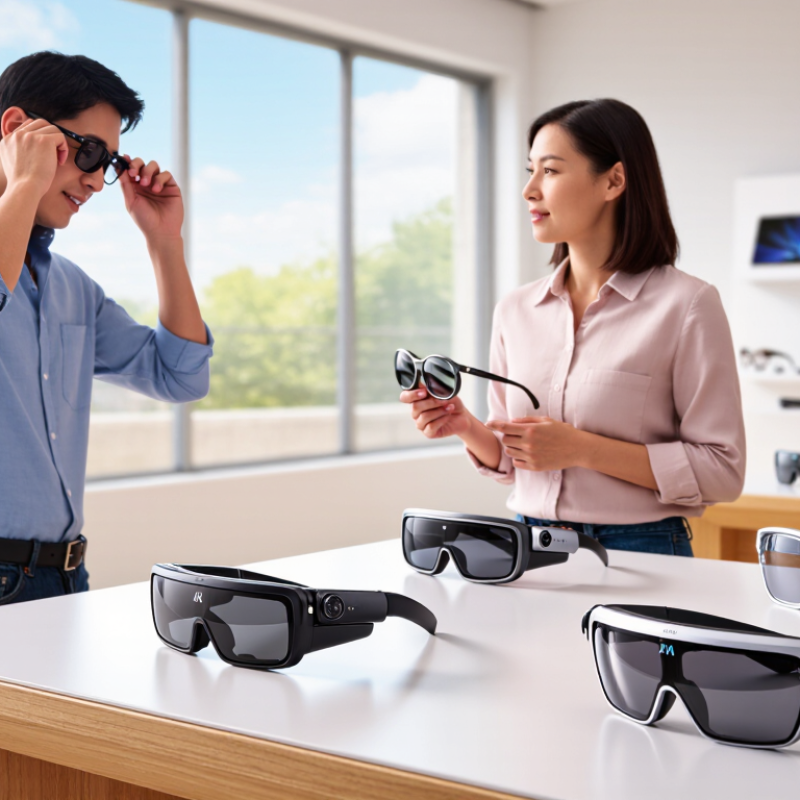
Bluetooth smart glasses are eyewear with built-in speakers, microphones, and a wireless connection to a phone. They can play navigation prompts, podcasts, or calls without covering the ears. The sound usually comes from small speakers near the temples, so music may feel less immersive than it does through headphones. Listen closely. In a quiet room, voices should sound clear, and call controls should be easy to find by touch. On a busy street, wind and traffic can expose weak microphones or limited volume.
Core features matter more than a long list of specifications. Check connection stability, battery life during calls, charging time, and whether the glasses reconnect reliably after being switched off. Bluetooth version alone does not guarantee better sound or range. Fit matters. Arms that press behind the ears can become uncomfortable, while loose frames may shift as you walk. Consider lens options, weight, button placement, and whether the glasses still work comfortably with your usual prescription. A specification sheet cannot reveal how they feel after an hour, and advertised battery estimates may differ from everyday use. If possible, test the controls and audio in a setting similar to where you plan to wear them.
Bluetooth Smart Glasses: Nominal Radio Data Rates
When comparing smart glasses, Bluetooth’s nominal radio rate is only one consideration. The figures below are specification-level PHY rates, not real-world throughput or a measure of audio quality. Check device compatibility, supported audio features, battery life, and call performance too.
Source: Bluetooth Core Specification. Bluetooth BR and EDR rates are shown at their nominal maximum; LE 2M requires support for the optional 2M PHY.
Choosing Bluetooth smart glasses in 2026 means balancing sound, connection stability, battery life, and controls. Open-ear speakers can make navigation prompts easy to hear while walking, but they may sound thin in a busy café. Check for clear speech and manageable sound leakage. Fit matters, too. A frame that slips can make even good audio annoying.
Bluetooth specifications offer clues, but real-world stability matters more. Look for reliable pairing with your phone and a quick way to switch between calls and media. Battery estimates often depend on volume and features such as voice assistants. If you take frequent calls, check talk-time figures separately from standby time. Small touch areas can be hard to use with wet fingers or gloves; physical buttons may feel less sleek but more dependable.
Tips: Test the controls while walking, and try a short call in a noisy room. Compare the stated battery life with your daily routine. A few extra hours on paper may not help if charging feels fiddly. There is no perfect balance, and the right compromise can take a little trial and error.
Before choosing Bluetooth smart glasses, check whether your phone supports the glasses’ companion app and required operating system version. Bluetooth pairing alone may not unlock calls, audio controls, or settings. Read the compatibility notes, then confirm the app is available for your phone. Try the setup process if possible. A feature list can look reassuring, yet a missing app update may leave useful controls unavailable.
Comfort needs a real-world check. Wear the glasses for at least 15 to 20 minutes, not just a quick fit in a shop. Notice pressure at the bridge of your nose, behind your ears, and along the temples. Walk around and turn your head; loose frames can shift. If you already wear headphones, test both together. Small annoyances matter. Heavier frames may feel fine at first, then become tiring during a commute. That part is easy to underestimate.
Check lens requirements before comparing extra features. If you need prescription lenses, ask whether the frame accepts your prescription range and whether replacement lenses are available. For outdoor use, verify the stated UV protection and consider whether tinted or photochromic lenses suit your routine. Do not assume every lens option works with every frame. I would also check how clearly the glasses explain lens specifications; vague details are a reason to pause. The smartest choice is not always the one with the longest feature list.
Privacy deserves more than a quick look at the product page. Check which sensors are built in, when they activate, and whether recording is clearly indicated. Review app permissions and available controls for deleting stored data. A tiny camera can still make people nearby uneasy. Be considerate in shared spaces, and do not assume a device’s default settings are the most private.
Durability affects daily comfort as much as lifespan. Inspect the hinge, nose pads, lens fit, and charging connection; these small parts often take the most wear. Check the maker’s stated resistance to sweat or rain, but do not treat it as permission to submerge the glasses. Safety matters, too. Frames should not slip into your field of view, and audio should stay low enough for nearby sounds. Take breaks if pressure, warmth, or eye strain builds. I would not wear them during tasks that need full attention; convenience can blur into distraction.
How to Choose Bluetooth Smart Glasses in 2026?
Set a budget around how often you will wear the glasses, not just their feature list. For occasional calls, prioritize a comfortable fit, clear microphone pickup, and simple controls. Comfort matters. If you plan to listen during a commute, compare battery life and sound leakage in a quiet room before buying. Open-ear audio can make nearby sounds easier to hear, but it may also be less private in a shared office.
For daily use, check whether the frame suits your face and works with your prescription needs. Ask about lens options and replacement costs; these can change the real price considerably. Test them indoors. Then try a short call near a fan or busy street, since microphone performance can vary with background noise. Small details count: buttons should be easy to find, and charging should not require a fiddly routine.
A low-cost model may cover calls and occasional audio, while a higher budget can bring better materials or longer battery life. Still, extra features are not automatically useful. I would compare the functions I expect to use each week, rather than paying for a long specification sheet. Check the return terms, too; comfort is hard to judge from photos, and even careful research can miss an awkward pressure point after an hour.
Compare common smart-glasses categories by typical price, connectivity, battery life, and practical use. Prices and specifications are indicative; they vary by region, prescription options, and individual model.
| Category | Typical Budget (USD) | Common Features | Typical Battery Use | Best For | What to Check Before Buying |
|---|---|---|---|---|---|
| Entry-level audio glasses | $50–$150 | Bluetooth audio, built-in speakers, microphone, and basic call or media controls. Usually no visual display. | Often around 4–8 hours of intermittent audio playback; actual time depends on volume and call use. | Hands-free calls, podcasts, and casual listening while keeping ears uncovered. | Bluetooth compatibility, microphone clarity, speaker privacy, comfort, and whether the lenses can be replaced or fitted with prescription lenses. |
| Mid-range audio and camera glasses | $150–$350 | Audio and call controls, with some models adding a camera, voice features, or companion-app support. Features vary considerably. | Commonly several hours of mixed use; camera recording and frequent calls can shorten runtime. | Everyday calls, casual audio, and occasional hands-free photo or video capture. | Camera resolution and recording limits, storage or phone-transfer method, privacy indicator, app support, and local recording rules. |
| Premium audio or camera glasses | $350–$700+ | More refined frames, improved microphones or speakers, and potentially better cameras, materials, or software features. | Varies by feature use; continuous recording and high-volume playback typically reduce battery life. | Frequent daily wear, clearer calls, and users who value upgraded fit, materials, or capture features. | Long-term software support, repair options, replacement-lens availability, water-resistance rating, and the cost of accessories. |
| Display-enabled glasses | $300–$1,000+ | One or more visual displays may show notifications, navigation cues, or other information. Some models also support Bluetooth audio. | Display use can draw more power than audio-only use; runtime depends on brightness, features, and whether an external device is connected. | Hands-free visual prompts, supported navigation, or viewing information without frequently checking a phone. | Whether the display is built in or requires a compatible phone or accessory, field of view, brightness, prescription support, and app availability. |
| Wired video-display glasses with Bluetooth audio | $200–$600+ | Wearable screens commonly receive video from a compatible phone, computer, or other source over a wired connection; Bluetooth may handle audio or controls. | Glasses may draw power from the connected device or a separate power source. Runtime depends on the host device and configuration. | Private-screen viewing, travel entertainment, or portable use with compatible devices. | USB-C video-output support, adapter requirements, power needs, fit, visual comfort, and whether the glasses work with the intended device. |
Quick buying tip: If you mainly want calls and music, prioritize fit, microphone quality, and battery performance. If you need on-lens visuals, confirm exactly how the display works and which devices and apps it supports; Bluetooth alone does not provide video input.